RAG AI Chatbot – Self-Hosted AI Knowledge Assistant
Project Overview
A custom-built Retrieval-Augmented Generation (RAG) chatbot that enables businesses to turn their website content and knowledge base into an interactive AI assistant.
The application combines a Laravel backend, Vue.js frontend, MySQL database, Qdrant vector database, and locally hosted Large Language Models (LLMs) served through llama.cpp. It retrieves relevant information from indexed content before generating responses, allowing the chatbot to answer questions using business-specific knowledge.
Designed with a multi-tenant architecture, the platform can support multiple websites with separate knowledge bases, making it suitable for businesses that want to integrate AI-powered customer assistance without relying entirely on external LLM APIs.
The project explores how modern AI capabilities can be integrated into a traditional web application while maintaining control over model hosting, data storage, and application infrastructure.
The Challenge
Traditional website chatbots often rely on predefined questions, manually maintained responses, or external AI services that have limited knowledge of a business's specific content.
Businesses need a more flexible solution that can understand their existing information and answer questions in natural language.
The main engineering challenges included:
- Converting website content into a format suitable for semantic search.
- Processing and splitting content into meaningful chunks.
- Generating and storing embeddings for efficient retrieval.
- Retrieving relevant information for each user query.
- Connecting the retrieval pipeline to a locally hosted language model.
- Maintaining separate knowledge bases for multiple websites.
- Integrating the AI functionality into a web application built with Laravel.
- Managing chat sessions, application data, and AI inference within a cohesive architecture.
The Solution
I developed a RAG-based AI chatbot that combines semantic retrieval with local LLM inference.
The application processes website content, divides it into smaller chunks, generates embeddings, and stores the resulting vectors in Qdrant. When a user submits a question, the backend retrieves relevant content and supplies it as context to the language model.
The model then generates a response using the retrieved information.
Laravel manages the application logic, data access, tenant isolation, retrieval workflow, and communication with the local inference server. MySQL stores the application's relational data, while Qdrant handles vector search.
By using llama.cpp to serve a local language model, the system can generate responses without sending every conversation to a third-party LLM API.
Key Features
1. AI-Powered Website Chatbot
An interactive chatbot that answers questions using information retrieved from a website's indexed content.
Visitors can ask questions naturally instead of manually navigating through multiple pages to find information.
2. Website Content Ingestion
The application can process website content to build a searchable knowledge base.
This creates a foundation for answering questions about a website's services, products, documentation, and other indexed information.
3. Intelligent Text Chunking
Content is divided into smaller, manageable text segments before embedding generation.
Chunking helps the retrieval system identify relevant passages instead of passing entire pages or documents to the language model.
4. Vector Embeddings and Semantic Search
The system represents text as numerical vectors and stores them in Qdrant.
When a user submits a question, semantic retrieval identifies relevant content based on meaning rather than relying exclusively on exact keyword matches.
5. Retrieval-Augmented Generation (RAG)
The chatbot combines retrieved knowledge with LLM-based response generation.
Instead of depending exclusively on the model's pretrained knowledge, the application provides relevant business content as context for generating answers.
6. Locally Hosted Language Models
The application uses llama.cpp to serve a local LLM through an HTTP API.
This architecture provides greater control over model selection, inference infrastructure, and the handling of application data.
It also reduces dependence on paid, per-request LLM APIs, although local hosting still involves hardware, infrastructure, and operational costs.
7. Multi-Tenant Architecture
The application is designed to support multiple websites within a shared platform.
Tenant-specific knowledge retrieval helps ensure that questions are answered using the appropriate website's indexed content.
This architecture provides a foundation for building an AI chatbot SaaS product serving multiple businesses.
8. Laravel-Powered Backend
Laravel manages the application's core functionality, including business logic, relational data, chat requests, and communication between the frontend, vector database, and LLM inference server.
The modular backend architecture keeps application responsibilities separate from the underlying AI inference process.
9. Persistent Application Data
MySQL stores structured application data, while Qdrant stores the vector representations used for semantic retrieval.
Separating relational data from vector search allows each system to serve its intended purpose.
10. Embeddable Chatbot Experience
The platform is designed to make AI-powered conversations available through a website chat interface.
This allows the underlying RAG functionality to serve as a customer-facing knowledge assistant rather than remaining limited to an internal development tool.
How It Works
The application follows a retrieval-augmented generation pipeline.
Knowledge Ingestion Pipeline
Website Content → Text Processing → Chunking → Embeddings → Qdrant
- Content collection: Website content is collected for indexing.
- Text processing: The collected content is prepared for downstream processing.
- Chunking: Text is divided into smaller segments suitable for retrieval.
- Embedding generation: The chunks are converted into vector representations.
- Vector storage: The embeddings and associated retrieval information are stored in Qdrant.
Question-Answering Pipeline
User Question → Semantic Retrieval → Context Construction → Local LLM → Response
- Question submission: A visitor asks a question through the chatbot interface.
- Semantic retrieval: The application searches Qdrant for relevant content.
- Context construction: Laravel prepares the retrieved information as context for the language model.
- LLM inference: The backend sends the prompt to the locally hosted model served by llama.cpp.
- Response generation: The model generates a response using the retrieved context.
- Response delivery: The generated answer is returned to the chatbot interface.
This separation between content ingestion, vector retrieval, and language generation makes the system easier to maintain and extend.
Technical Architecture
The application uses separate components for web application logic, structured data storage, semantic retrieval, and language model inference.
| Component | Technology | Responsibility |
|---|---|---|
| Backend | Laravel / PHP | Application logic, APIs, retrieval workflow, and LLM integration |
| Frontend | Vue.js | Chat interface and application interactions |
| Relational Database | MySQL | Structured application and tenant data |
| Vector Database | Qdrant | Embedding storage and semantic similarity search |
| LLM Inference | llama.cpp | Local language model serving |
| Language Models | Local GGUF models | Context-aware response generation |
| Content Processing | Text processing and chunking | Preparing website content for indexing |
| Retrieval Pipeline | RAG | Retrieving relevant knowledge and constructing model context |
| Infrastructure | Linux | Application and supporting service deployment |
Why This Architecture?
The architecture separates the responsibilities of the application and its AI components.
- Laravel provides a familiar, maintainable foundation for business logic and APIs.
- MySQL manages structured application data.
- Qdrant handles vector storage and semantic search.
- llama.cpp runs the selected language model locally.
- Vue.js provides the interactive frontend experience.
This approach makes it possible to evolve the application without tightly coupling the business logic to a particular LLM provider.
Technology Stack
Backend: Laravel, PHP, REST APIs
Frontend: Vue.js, JavaScript
Database: MySQL
Vector Search: Qdrant
AI & Machine Learning: Retrieval-Augmented Generation (RAG), embeddings, semantic search
LLM Inference: llama.cpp, locally hosted GGUF language models
Infrastructure: Linux, self-hosted AI services
Engineering Highlights
Building a RAG Pipeline from the Ground Up
The project brings together content preparation, chunking, embedding generation, vector search, context construction, and LLM inference into a single application workflow.
Integrating Local LLM Inference with Laravel
Instead of treating the language model as a separate product, the application integrates local inference into the Laravel backend through an HTTP API.
This keeps model execution separate from application logic while allowing Laravel to control the retrieval and prompt-construction process.
Combining Relational and Vector Databases
MySQL and Qdrant serve different purposes within the same application.
MySQL manages structured records, while Qdrant provides semantic retrieval capabilities for the knowledge base.
Designing for Multiple Websites
The multi-tenant approach provides a foundation for serving different businesses from the same application while keeping their knowledge retrieval appropriately scoped.
Reducing Dependence on External AI APIs
Using a locally hosted model gives the application greater control over inference and reduces the need to send every prompt to an external model provider.
The trade-off is that inference performance, concurrency, and operational cost depend on the available hardware and model configuration.
Potential Use Cases
The underlying architecture can be adapted to several business scenarios:
- Website Customer Support: Answer common questions about a company's services and policies.
- Product Knowledge Assistants: Help visitors discover information about products and features.
- Documentation Chatbots: Make technical documentation easier to search through natural-language questions.
- Internal Knowledge Assistants: Provide conversational access to company documentation and internal resources.
- Educational Platforms: Help learners find information in course materials and educational content.
- AI-Powered SaaS Products: Add knowledge retrieval and conversational AI capabilities to existing applications.
These are potential applications of the architecture rather than claims of existing customer deployments.
Project Outcome
The project demonstrates an end-to-end approach to building a knowledge-based AI chatbot using a conventional web application stack and locally hosted AI infrastructure.
It brings together Laravel application development, semantic search, vector databases, text chunking, embeddings, and local LLM inference in a single system.
It also establishes a foundation for developing customizable AI assistants that can be connected to website content and adapted to different business requirements.
Screenshots
The following screenshots should be added to demonstrate the application's actual interface and functionality.
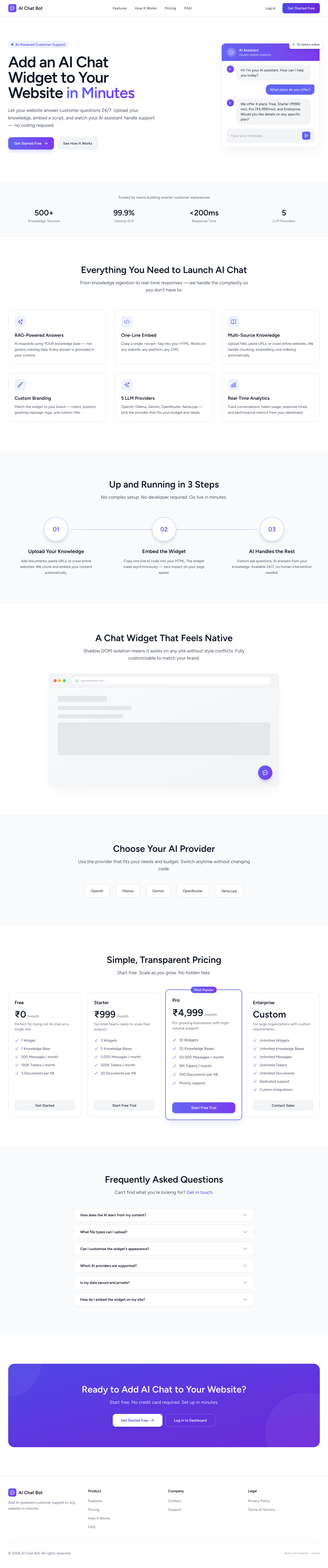
Project Landing Page
Show the main landing page introducing the AI chatbot platform.
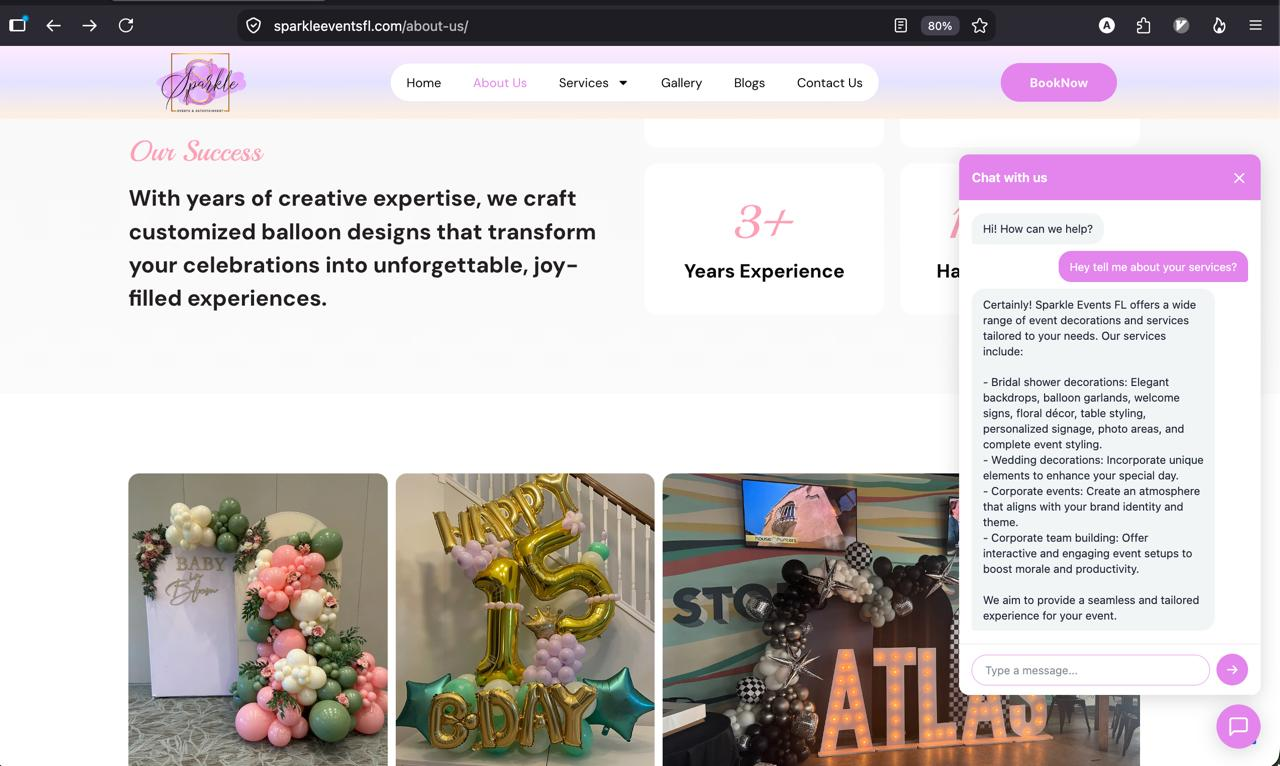
Chatbot Interface
Show the conversational interface used to ask questions and receive AI-generated answers.
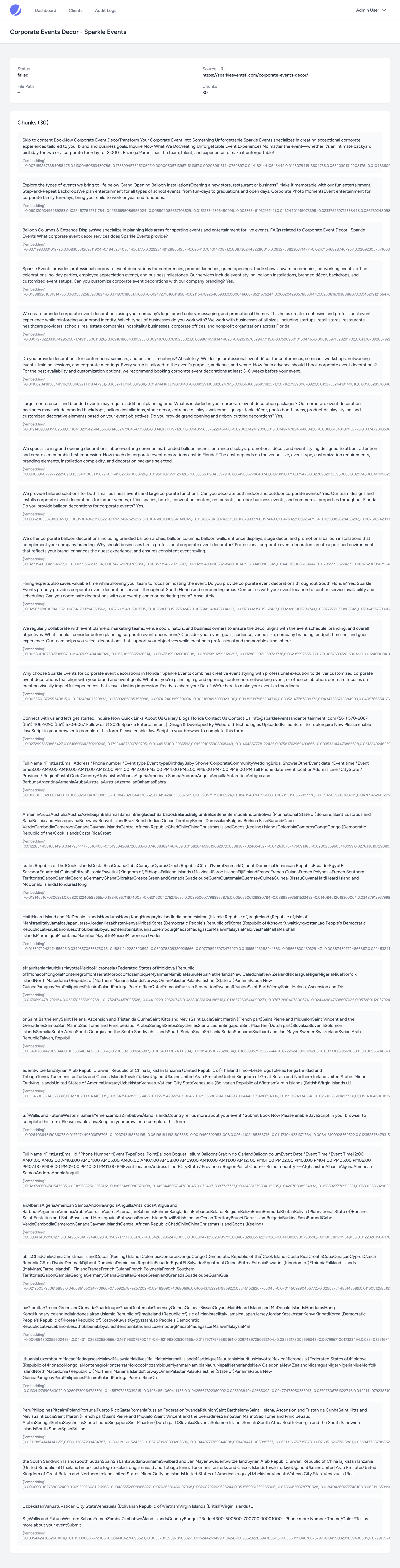
Knowledge Base Management
Show the interface used to manage indexed website content or knowledge sources.
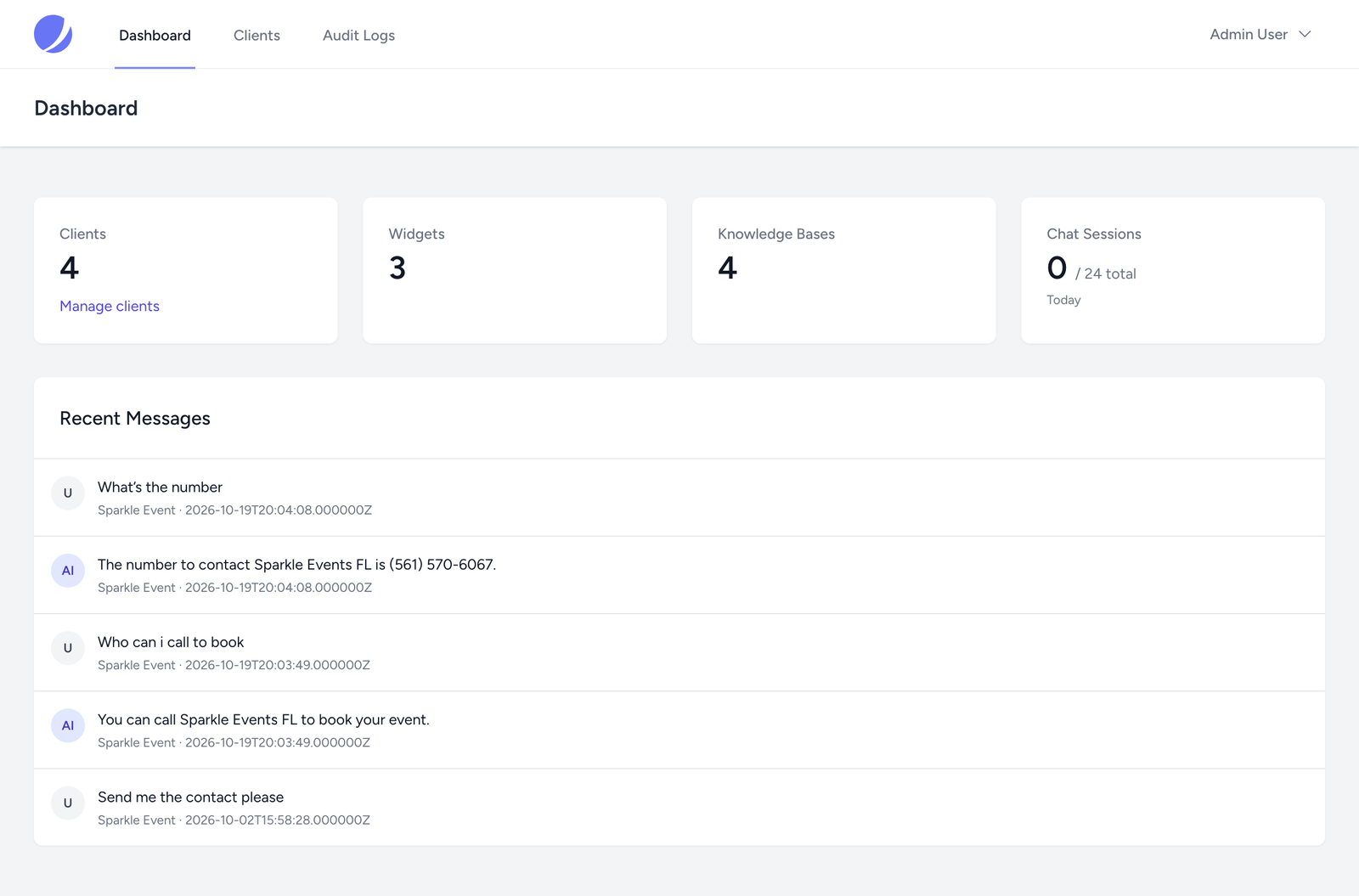
Application Dashboard
Show the application's dashboard or administrative interface, if available.
Explore the Project
Live Project: https://200.141.6.204/
Interested in building an AI chatbot that understands your website and business knowledge?
Explore my RAG chatbot development service to learn how I can build a custom AI assistant for your website, SaaS platform, or business application.